Webflow Development Guide for Modern Businesses

Webflow Development Guide for Modern Businesses

20 JANUARY 2026

Modern businesses don’t just “need a website.” They need a fast, secure, scalable, conversion-ready web experience that supports marketing campaigns, product launches, SEO growth, and brand trust- without creating a never-ending dev queue.

That’s where Webflow Development fits. It blends visual building with production-grade outputs, giving teams a faster path from design to a live website, while still supporting custom Webflow development when you need unique functionality.

To understand why businesses are rethinking website platforms, look at how big and competitive the web has become. There were 1.88 billion websites online (Statista chart, based on Internet Live Stats).

Cloud infrastructure, where most modern websites ultimately rely for hosting, delivery, analytics, and integration, is expected to keep accelerating in 2025. A chart published by Statista indicates that cloud infrastructure spending in Q3 2025 rose 28% YoY, and 2025 revenues are forecast to finish the year at $400B.

What does this mean for you?

More competition, higher performance expectations, and a stronger need for clean site architecture, speed, and reliable deployment workflows are exactly what businesses evaluate when choosing Webflow website development.

What is Webflow Development?

Webflow Web Development is the full cycle of creating, developing, optimising, and supporting websites with the visual development platform of Webflow, which usually combines:

  • Webflow Designer create (layout, interactions, CMS templates)
  • CMS structure (collects, dynamic pages, file filtering setups)
  • SEO and performance improvement (structure, metadata, speed basics)
  • Integrations (CRM, analytics, marketing automation, forms, Zapier/Make, etc.)
  • Custom Webflow development (custom code embeds, complex UI logic, 3rd-party apps)


Webflow allows teams to build modern websites using a design-first workflow and still enables developers to customise the website when necessary.

Why Webflow for business: The thing modern teams actually need

Most companies today rely on overlapping teams such as marketing, product, design, sales, and operations. A “developer-only” website workflow slows everyone down. Webflow helps businesses by reducing friction across these areas:

1.
Faster go-to-market

Launch pages, service pages, landing pages, and content hubs matter for growth, but typical CMS workflows can be slow (plugins, themes, dev tickets, QA delays). One for businesses with WebflowTeams, where marketing and design teams can work faster while maintaining brand consistency.

2. Cleaner design-to-live workflow

Common handoff issues (Figma-to-code mismatch, component inconsistencies, last-minute compromises) are accepted as given. Webflow shrinks that gap by letting teams build closer to the final visual intent.

3. Scalable content using Webflow CMS

For businesses that publish blogs, case studies, job posts, service pages, or location pages, Webflow CMS is a strong fit, especially when paired with a solid SEO structure and templates that maintain consistent quality.

4. Performance-driven websites

And though performance will depend mainly on build quality, Webflow sites can be organised cleanly, helping product-driven companies to keep the mess down and ship pages that are easier to manage and optimise over time.

Advantages of using Webflow for company websites

When weighing the advantages of Webflow for business sites, decision-makers usually want to know about results, not features. Here are the advantages that directly reflect on business impact:

1. Marketing agility (Campaigns + Landing Pages )

Looking for a fresh page to introduce a new product, webinar, seasonal offer or hiring campaign? Webflow lets you ship pages as quickly as possible and iterate on them using performance data.

2. Brand consistency at scale

With thoughtful components, styles, and CMS templates, your site avoids the “every page looks different” problem that grows over time in many CMS stacks.

3. Easier collaboration between teams

With Webflow, bottlenecks shrink immediately when everyone has controlled access to marketing, tweaking words, designers perfecting layout and structure, and developers tackling the hard stuff, especially with Webflow development services.

4. Conversions-friendly Modernised UX

Webflow backs complex interactions, sleek layouts and responsive design, all significant for businesses that live by trust and differentiation (B2B, SaaS, healthcare & legal services, premium products, etc.)

Who should choose Webflow development for modern businesses?

Webflow isn’t “best for everyone,” but it’s an excellent fit for many modern teams. It typically works best if you are:

  • A startup needing fast launches and iteration
  • A service business wanting a premium brand experience
  • A B2B company building lead-gen funnels (SEO pages + landing pages)
  • A tech brand that wants design quality without constant plugin maintenance
  • A team that needs a CMS but doesn’t want heavy dev cycles for every content update


If your site depends on extremely complex backend logic, heavy membership systems, or deep ecommerce customisation, Webflow may still work- but often with integrations or hybrid architecture.

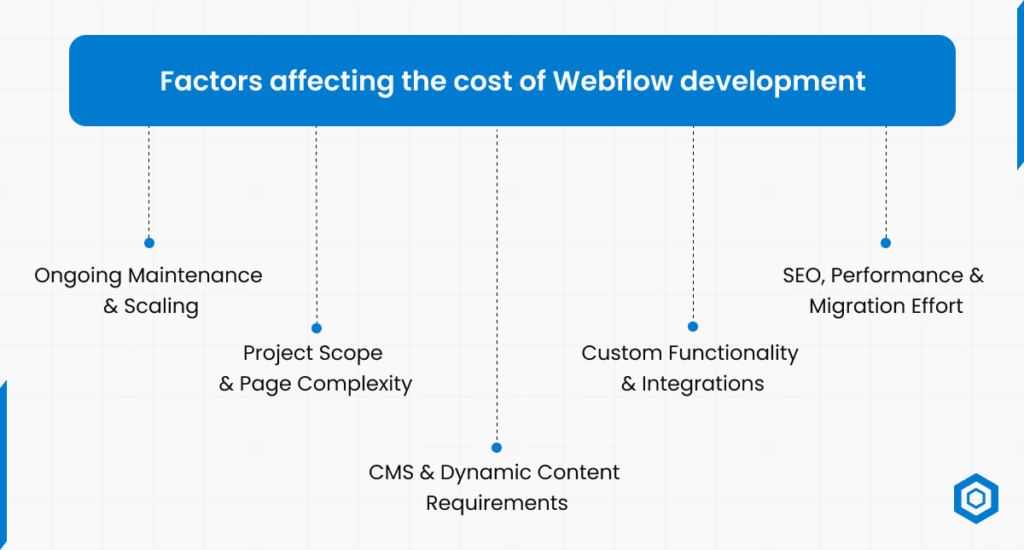
Webflow website development process

A reliable Webflow build is not “just designing pages.” A professional process usually follows:

1.
Discovery & Business Alignment

Every successful Webflow website development project starts with profound discovery. This is the phase to identify business goals and to understand competitors and conversion targets. 

With precise alignment at this point, you guarantee the website structure to help lead gen, position your brand, and scale long after launch. For modern businesses, discovery also defines how Webflow for businesses will support marketing and growth teams.

2.
Information Architecture & Sitemap Planning

Information architecture is the backbone of effective Webflow development for modern businesses. Pages, navigation, and internal linking are planned to improve user experience and SEO crawlability. 

A well-organised sitemap makes it easy for your site’s visitors to find what they’re looking for and helps search engines find and prioritise information on your site. This action is significant for load time and bounce rate.

3. UI/UX Design & Visual System

In this stage, Codeflash Infotech, a premier UI/UX Design Company, creates a consistent visual system reflecting brand identity and business credibility. Our Webflow development ensures pixel-perfect layouts with responsive behaviour across all devices. Typography, spacing, and reusable components are designed to maintain consistency, building the trust and engagement needed to drive conversions.

4. CMS Architecture & Content Modelling

Webflow CMS is designed to power your blogs, services, case studies, jobs or dynamic pages seamlessly. CF, collections, and some templates are carefully planned out so that Content Editors can go in and “maintain” the site without destroying layouts. 

This is a critical advantage of custom Webflow development, especially for medium- and large-sized businesses that regularly produce SEO-friendly content. 

A codebase that’s easy to work with. Today, a CMS and yes, this includes publishing platforms like WordPress, means one thing: spare the great unwashed your precious code. 

You’re not lucky; just anything will wrap around URLs as code. A well-constructed CMS will lend you scalability and future maintenance.

Hire Skilled WordPress Developers for Your Next Project.

5. Custom Webflow Development & Interactions

Go more aggressively with complex layouts, deeper animations, and interactions, using native Webflow capabilities and custom code to really push those boundaries. With custom Webflow development, you can incorporate custom interactions, dynamic filtering, third-party integrations, and better UX. 

These attributes help contemporary businesses add a unique touch to their performance offerings. Lean development to keep your site lean and flexible. SEO, Performance & Quality Assurance, the site remains stable and scalable.

6. SEO, Performance & Quality Assurance

SEO is integrated directly into the Webflow development process rather than added later. Meta tags, heading structure, schema basics, image optimisation, and internal linking are implemented carefully. 

Performance testing is an important ranking factor, mainly because load time and mobile responsiveness are heavily weighted. QA checks forms, links, CMS content and cross-browser compatibility. 

And that, in fact, is precisely why Webflow development services are key. It’s really all about the build and discipline in architecture that gets you there.

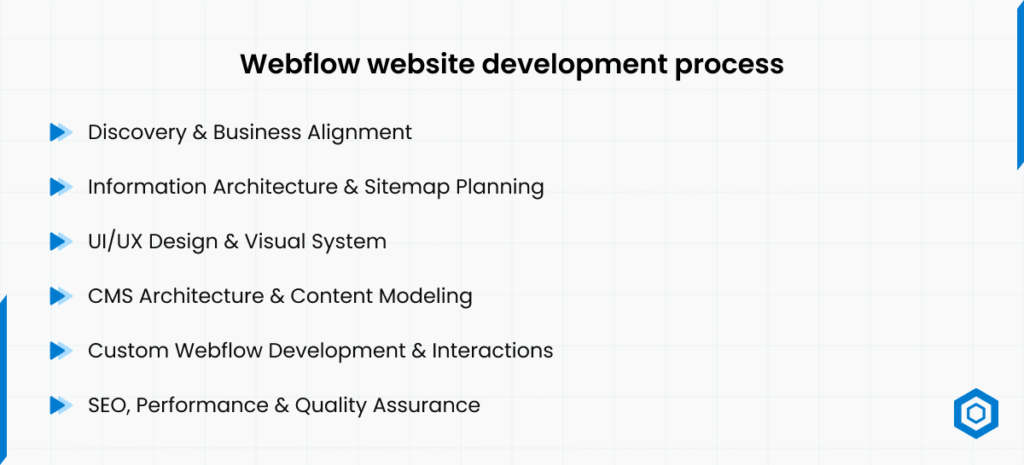
Factors affecting the cost of Webflow development

Factors affecting the cost of Webflow development

What is the typical cost of Webflow development? Businesses often look up the cost of Webflow development and want a straight-up answer, but the price depends on many factors. Key cost drivers include:

1.
Project Scope & Page Complexity

Webflow development pricing is primarily determined by the number of pages and the complexity of their layouts. The bottom line is that it costs way less for basic marketing sites with reusable templates than for those that are entirely custom, featuring image sliders on every page. 

Webflow web design costs increase when pages require complex interactions and animations, as well as a custom layout. Businesses should define the scope clearly to control costs.

2. CMS & Dynamic Content Requirements

Webflow site development costs increase for complex CMS architecture. Multiple collections, dynamic filtering, content migration, and template customisation add development time. 

Businesses with blogs, case studies, or service-based architectures often need advanced CMS planning. This up-front investment improves scalability but increases overall project cost.

3. Custom Functionality & Integrations

Webflow custom development, including third-party integrations, will influence pricing. You’ll have to test and follow the same process for CRM connections, marketing automation, form routing options, analytics, PMT tools, or gated content. 

These integrations are essential for businesses that rely on lead management and data tracking in Webflow. The development cost will be higher the more automation is needed.

4. SEO, Performance & Migration Effort

For a business moving from WordPress to another CMS, or vice versa, with migration costs, the price increases because we need to preserve SEO and transfer the content. 

Redirects, URL format consistency, metadata handoff, and content scrubbing must be executed meticulously. Performance tuning and technical SEO setup are also cost contributors. These processes are all essential for maintaining your existing rankings and traffic. 

5. Ongoing Maintenance & Scaling

Although Webflow diminishes the need to maintain plugins, businesses may need ongoing support. Maintenance costs of deployment (new Landing pages, CMS extension, as well as performance tuning) over the long run. 

Webflow Development for Modern Businesses: SEO & Growth Checklist

To consistently rank well and support AI-powered search experiences, Webflow sites need to be built with intent above aesthetic appeal. Here are the key areas businesses should zero in on.

1. Search Intent–Driven Page Architecture

Each page should serve a specific user intent, whether it is informational, commercial or transactional. Webflow development for modern businesses works best when service pages, blogs, and landing pages are structured to answer specific user questions. 

Blessed with clear headings, coherent sections, and internal linking throughout over here. Contextual internal links boost both crawlability and the time people spend on a page. Such a match favours ranking and conversion.

2. On-Page SEO & Semantic Optimisation

And the truth is, today’s SEO has less to do with keyword stuffing and more with context and relevance. Detailed control over headings, metadata, alt text, and schema basics, Webflow website development, and fine-tooth-comb keyword deployment. 

Semantic keyword positioning ensured a better presence on AI snapshots and featured snippets. This, combined with excellent, high-quality content, ensures long-term ranking stability.

3. Core Web Vitals And UX Signals

Google is paying more and more attention to how users are engaging with a site. For businesses, Webflow encourages clean layout structures, adaptable design components, and efficient asset management when built correctly. 

Fast load times, mobile optimisation, and intuitive navigation all lead to reduced bounce rates. These UX signals matter a lot for Organic performance and trust.

5. Conversion-Focused Design Structure

You can only do so much with SEO traffic; you want them to convert. Custom Webflow development to better place CTAs, forms, lead magnets, and proof points. Strong visual hierarchy leads users toward action without inundating them. It’s this trade-off between design and conversion that is so important to a business website today.

Webflow Development Mistakes That Negatively Affect Your Rankings

As powerful as Webflow is, execution can get in the way of a great result.

1.
Overdesign Without Structure

Excessive animations and a cluttered interface could make usage difficult and lead to performance issues. Businesses of today must walk a tightrope between creativity and clarity to meet SEO and UX standards.

2. Poor CMS & Internal Linking Strategy

Bad CMS planning results in fragmented content, templated breakages, and poor internal linking. This hampers discovery crawls and ranking, though.

3. Ignoring SEO During Build

Post-launch SEO means redoing the work and losing potential. To avoid structural restrictions, SEO must be baked into Webflow development services from the beginning.

Conclusion

Webflow development has been a fantastic choice for businesses in the contemporary age of speed, design quality, and scale. Whether you are a startup or an enterprise, Webflow website development is the perfect way for your teams to create high-performing, SEO-friendly, and goal-achieving websites.

With the correct approach, Webflow for companies allows you to create value without having to apply ‘bandaid’ solutions constantly.

At Codeflash Infotech, we offer comprehensive Webflow development services designed to help businesses grow. From bespoke CMS structure and marketplace website development cost consultation to SEO preparation and scalable design systems, our team ensures your site is a powerful digital asset.

Whether you are starting, growing, or transferring, Codeflash Infotech can help you make the most of Webflow.

Frequently Asked Questions

Webflow development is the process of creating, building, and honing slick-looking websites with Webflow’s visual development tool. The benefits of Webflow for business websites are that it helps them to ship faster, stay on brand, and scale content without a heavy developer lift.

Yes, Webflow is extremely SEO-friendly if you build it right. With a well-maintained structure, an adaptable design, and a robust CMS, all of which give the Webflow website the durability to grow organically in the long term.

The price for Webflow development varies by the complexity of the page, the level of CMS involvement, and the extent of custom functionality and integrations. Sites at that level for Webflow are cheaper, but custom development projects with Webflow tend to carry a higher price tag.

Yes, with proper planning. Webflow development for modern businesses supports scalable CMS structures, multi-page architectures, and performance optimisation when implemented professionally.